Saturday, July 12, 2014

Steps-by-step procedure to submit IT Return

July month is the time to file you IT return. Income Tax Department has come up with an easy way to file IT return.
Step 1: Log in to the Income Tax Department site. (https://incometaxindiaefiling.gov.in/).
Note:
  • For registration, PAN card is mandatory, and this number will be your user ID.
  • Keep your Form 16 handy, that is provided by your company.
Step 2:
a. In the Quick Link section, click Quick e-File ITR.
b. Provide the IT returns detail as illustrated in Figure 1.
Note: If you have income from any other source other than interest (such as, shares, property deals, and other), which attracts tax under different clauses; select correct ITR form.
Figure 1. Prepare and Submit Online
Prepare and Submit Online
Step 3:
a. In the Personal Information tab, provide your personal details.
b. Click the Save Draft icon.

Monday, May 05, 2014

Deleting unused images in RoboHelp

You can view the list of unused image files in the RoboHelp project from: Tools>Reports>Unused Files. However, you cannot delete those files from the RoboHelp project. You can delete the file names from the Windows Explorer, which is a tedious work and prone to error. It becomes more challenging when the size of your project is big and files got filled up during several updates.

RoboHelp support java script to automate the task in the project. Don’t worry if you are not expert in java script. You can download the imagecleanup.jsx that is freely available at: https://www.wvanweelden.eu/product/image-cleanup
  1. Open the RoboHelp project for which you want to delete unused images.
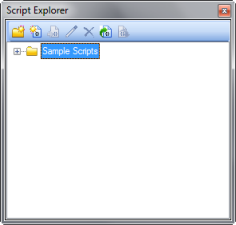
  2. To open the Script Explorer pod, click View>Pods>Script Explorer.
    The 
    Script Explorer pod opens.

  3. Image: Add caption

Monday, August 19, 2013

Technical Writers vs Instructional Designers

The objective of a technical writer is to help the users in using the product. When a user is struck in understanding a feature or task, they consults the document as a reference. While an instructional designer make the user learn. The learner needs to go through the complete instructional design deliverable. If we talk about WBTs or CBTs, each and every activity of learner is tracked. The learner uses the instructional design deliverable as a textbook and not as a reference guide.
To conclude, technical writers write documents for potential users while instructional designers for potential learners.

Sunday, May 12, 2013

Scenario-based learning


Scenario based learning is the becoming popular to showcase a feature of an application. Scenarios are based around actions, where you need to create a story and the characters who will perform the task in the application. 
If you tell your story effectively and create good characters, your learners become invested in that character's story, regardless of whether they're rooting for their success or their downfall. Once you have your training plan outlined and sequenced with your lessons, you are ready to begin. Introduce the character and then present her/him with a problem that they (and the learner) cannot overcome. Develop the story so that it steps the learner on a journey through the learning objectives, getting the knowledge and skill along the way to meet the challenges presented at the outset of each learning objective. 
Creative writing courses will help immensely with storytelling as well as scenario based learning, but you may also think about technical writing for complex procedures.

To learn more about scenario-based learning, view the demonstration to buy books from Amazon.com on Youtube.

Monday, March 11, 2013

Lucidchart quick start guide


Introduction

Lucidchart is an HTML5-based diagramming tool to create flowcharts, wireframes, UML diagrams, mind maps, and more. You can open this tool on a Google chrome browser and work with the team members in real time.

Installing Lucidchart

To install and configure Lucidchart with Google Drive:
  1. Go to https://chrome.google.com. 
    The Chrome Web Store page appears.
  2. In the Search Apps text box, type Lucidchart and press EnterIn the Apps tab, the result page displays the Lucidchart: Diagramming app. 
  3. Click Install
    A confirmation message asks whether you want to install Lucidchart on Chrome. 

    Note
    : Before installing Lucidchart, sign in with your Google account.

Tuesday, February 12, 2013

Do you like to read a user guide or view a video tutorial?


People prefer instant help, sometime they don’t like to read the content to find the answer of their queries. It is helpful if someone shows you the steps to solve the problem, rather than navigating the user guide and troubleshoot the problem. People sometime prefer a video tutorial to view the how-to-do task.

Nowadays we get everything on mobile, prefer a video or online help for a product.  For software products, printed document will soon be past.  The internet and mobile has reduced the distance between the user and the vendor.
The product simulations and demonstrations can attract the attention of people. A technical writer can create video tutorial by using the Captivate and Articulate, these e-learning tools can also create course and quiz for the learners.

The sales personnel prefer a product demonstration for the clients and seminars. These demonstrations give a better walk through the product in a nut shell, instead of running the product. The beta version of the product might not be ready on time or create run-time error.

People can grasp the features of a product by watching the tutorial at their own time. Watching a video is always fun than reading a document.

Wednesday, June 20, 2012

What managers want?


Managers want to see the ability to manage the documentation project, starting from initiating the task and meeting the users’ need. It is appreciated, if a tech. writer can provide some value added services, like suggesting on the UI texts, workflow diagrams, visual aids, and features. Developers want to see that you're familiar and invested. They want to work with resourceful and proactive tech writers. Your specific questions will reflect how much you're actually working with the technology. Never the less some time follow ups are required to get confirmation of your queries and assumptions.

Wednesday, January 25, 2012

Captivate: control flash animation

When there is an audio flash file in your Captivate slide and the user click next, the sound of the animation might not stop and it keep playing in the background of the next slides. This issue does not happen when you preview the project, but for the published file. The problem can be solved as per the the following three cases:
Case 1: In Cp 5.5, under the AUDIO section of the button properties, click to select the Stop Slide Audio When Clicked check box. Note that this feature doesn’t work, if the sound is embedded in the FLA file.
Case 2: If sound is embedded within the FLA file and you can edit the flash file, bring the embedded sound at the top level in the timeline of the slide.
Case 3: If sound is embedded within the FLA file and you cannot edit the flash file, create an advance action. In the advanced action, you can define two actions: hide the flash and go to next slide. The hide action will stop the sound of the flash file.

Monday, November 28, 2011

RoboHelp: Breadcrumbs

When I created breadcrumbs through the WebHelp Navigation – WebHelp dialog box, then breadcrumbs were created on top of the HTML header. In other case, when breadcrumbs were created through master page, breadcrumbs were created below the header.
However, I wanted the breadcrumbs above the header. What would be the answer???


Ohhh.. I think Im close to my answer. I removed the header, instead of that I used a simple text in the master page, which I used it as a header for the HTML files. Then I inserted the breadcrumbs. That was simple....

Tuesday, August 23, 2011

SWF for Android Phones

I successfully played a SWF file locally (by copying it in the SD memory) on a Dell Streak through this link:

file://sdcard/[filename].swf

However, my friend could not play on Xoom (Android 3.0 Honeycomb) through the same link. Then I figured out that there was also a same issue with Acer Iconia Tab A500, which also runs on Android 3.0 Honeycomb.

Then a flash developer came to my help. He converted the SWF file into the APK format that could be played on Xoom.

Sunday, July 03, 2011

Text animation


In the Captivate (4.0), I wanted that after the Text Animation object is over (i.e., not in loop) then the text should display for rest of the slide.
TIP: For the Text Animation object, take the Effect as Typing Text and kept its Delay for: Rest of the slide. The text remains on the screen after the animation is over. The real time typing cannot be copied to other slide, and then you can replace it this Text Animation.

Wednesday, February 23, 2011

Cross-reference with Soft-return

The MS Word soft return would mean line break due to word wrapping. In numbered list, if soft return is used, then the whole text is seen in the cross-reference pop-up window. So, it’s better to use separate style for the description of the numbered list.

Monday, January 10, 2011

I can't stop playing games with software.....

Tools and software makes me crazy!!! I do really have soft corner for the software and their usage...
I always tried (& keep trying) to become a techno-wizard.
Now, IT profession has be forefront with the latest technology trends and software updates. One can enhance their skill by practicing on a Tool.
Once Einstein quoted that if a person spend 10000 hour of on one subject then he/she becomes specialist on it.
However, as in the case of Technical Writers most of us have to wear many hats of tools and software, and give their best in the crunch of deadlines. Even a person working in a single tool for many years, how many has explored all the available features. The fact is that, we keep doing the same task if there is no requirement or scope is within the boundary.
Sometime, mastering the similar tools simultaneously is difficult.
·         Word/FrameMaker
·         RoboHelp/MadCap/Authorit
It is always challenging to work on multiple platform and technology. I put my hat off to those who do multi-tasking. In IT industry, we go ahead with a slogan as “Just to it”.

Sunday, December 12, 2010

Multi-Language

Multilingual people in IT help to build the harmony and brotherhood among the people, where most states of the India are divided on the basis language. IT is a huge resource pull of technical peoples of different region, religion, caste, language, and gender are present. Hindi is India’s official language and English as second official language, outsourced jobs are boarded in India because of skilled English speaking peoples. In addition, because of multilingual peoples are working in a single place, they are sometime forced to talk in English.
In India, many universities and institutes provide foreign language trainings. There are many doctorates in French, Spanish, and German languages. Now, these foreign language skills are used in IT companies and India too is able to attract jobs from European countries.

Tuesday, December 07, 2010

Curve text in Microsoft Word 2010

In the lower versions of Microsoft Office 2010, the curve text feature is not available through WordArt.
Trick: Save the Microsoft Word 2010 document in 97-2003 format. The old feature of WordArt is enabled. Now, you can use the curve line feature.
It is observed that you cannot play the same tricks in Microsoft PowerPoint 2010.
Trick: Copy-paste the curve text from the word document into the PowerPoint 2010 slide. Hurrah!!!

Sunday, October 24, 2010

Bloom’s Taxonomy in Technical Writing

The application of Bloom’s Taxonomy consistis of presentation, design, and assessment strategy. It can be used in e-learning, web-based training, or user manual. An application level objective requires simulations and step-by-step description. While, higher level learning requires case studies and role plays.

Six Levels of Cognitive Domain:
  • Knowledge: The information should be well-defined and explained to the user satisfaction. Describe the product background and features.
    Keywords: defines, describes, identifies, knows, labels, lists, matches, names, outlines, recalls, recognizes, reproduces, selects, and states.
  • Comprehension: Understanding of the application should be summarized. Describe the interface and behavior of the product.
    Keywords: comprehends, converts, defends, distinguishes, estimates, explains, extends, generalizes, gives, infers, interprets, paraphrases, predicts, rewrites, summarizes, and translates.
  • Application: Put the statement into action and relate the application with the document. Describe the product in step-by-step process.
    Keywords: applies, changes, computes, constructs, demonstrates, discovers, manipulates, modifies, operates, predicts, prepares, produces, relates, shows, solves, and uses.
  • Analyze: Scrutinize the information and verify with latest data. Provide relevant screenshots and references.
    Keywords: analyzes, breaks down, compares, contrasts, diagrams, deconstructs, differentiates, discriminates, distinguishes, identifies, illustrates, infers, outlines, relates, selects, and separates.
  • Synthesis: Create and predict the data. Describe how one action affects the product usage.
    Keywords
    : categorizes, combines, compiles, composes, creates, devises, designs, explains, generates, modifies, organizes, plans, rearranges, reconstructs, relates, reorganizes, revises, rewrites, summarizes, tells, and writes.
  • Evaluation: Interpret and justify the information. Proofread and verify it by SME.
    Keywords
    : appraises, compares, concludes, contrasts, criticizes, critiques, defends, describes, discriminates, evaluates, explains, interprets, justifies, relates, summarizes, and supports.

Friday, August 27, 2010

Microsoft Word numbered list

I am quite happy with MS Word 2010 for many reasons. Among them, I found numbered list is pretty robust than the earlier version of word. It does not break now and user need not to play tricks to bring the numbering in shape. However, I found an interesting fact of numbering format.
If the existing number list has bold text and the same list text are copied into other part of the document. After restarting the numbered list, the source text changes from bold text changes to normal text.
TRICK: Press Ctrl+z, the text returns to the previous format.

Saturday, June 26, 2010

Copy and paste

In IT industry, copy (CTRL+C) and paste (CTRL+V) action is the major action. Someone might have truly said that if "C" and "V" buttons are removed from the computer keyboard, then most of our work would come into standstill.
Once I faced an acute problem with the copy-paste action in MS Publisher, in fact there was nothing wrong with Publisher. I was not able to copy text from other application like, notepad. Within the Publisher, text and objects could be copied pasted. Then, I looked in the clipboard; there I found everything was copied into the clipboard, but not in the actual insertion point.
The easy solution I found as most of the computer user that I closed Publisher and again opened it. Ahh.. now my copy-paste action works fine. This is not the solution of what I faced, but it might be one of

Friday, May 07, 2010

Snagit window capture

Snagit 9.1.2 window profile captures the application window. However, Java application by-passes the native operating system and shows the child window through the “swing” technology. This makes job of Snagit difficult to capture the child window or a dialog box individually.
I posted this problem to the Snagit support team. Let see, if Snagit's next version comes up with a solution.

Tuesday, March 02, 2010

Simple work

The task you could do easily is said to be “simple work.” If you are asked to fill some color using a paint editor, you would do it quickly. Now, if you are asked to edit an image in the Photoshop editor, then you need some knowledge on it. First you would find many tools available, most of their usage you don’t know. You try to look for some help or training, otherwise lot of time is spend in searching and trying your hand in all of them to get your required result. At the end you would exhaust yourself; you would get fear with the work and try to avoid the task.

The scenario would change, if you would get some overview of the product and know the purpose of the tools. This is the case of every user irrespective of their domain knowledge. Basic knowledge is required to work with product. So, here comes the “Help” that could be a tutorial, user guide, demonstration, and so on.

I think of myself, when I first get into the product and run for help, asking my teammates for assistance. I go through the knowledge transfer session, and made a list of questions to ask the SMEs. I still find myself in a comfortable zone surrounded by peoples who could at least answer my queries. After all I am getting paid to know about my company product and give the best out of my effort.

The user who stats from the scratch, have no knowledge of the product, would get difficulty in doing their work. In the market, there are many vendors to provide the same product; however, the price is a different factor to convince the purchase. Therefore, in the trial version if the customer (user) is not handy with the product. They would never go ahead to purchase it.